
MEPCO Bill Check Online
MEPCO Bill Checker
Enter your 14-digit reference number or 10-digit consumer ID to view your MEPCO bill
Use only the reference number printed on your MEPCO electricity bill.
MEPCO bill check online lets you view your Multan Electric Power Company duplicate electricity bill instantly. Enter your 14-digit reference number or 10-digit consumer ID in the bill checker above, then download, print, or save your latest WAPDA MEPCO bill as a PDF.
Our tool connects to the official PITC web-bill portal and shows unit consumption, due date, payable amount, and up to 12 months of billing history. Use our MEPCO Bill Calculator to estimate costs, read our About Us page, or check detection bills for supplementary charges.
The official MEPCO web-bill system is provided through PITC (Pakistan Information Technology Company), which powers online electricity bill checking for MEPCO and other DISCOs across Pakistan.
Your bill may contain useful information about your billing period, electricity consumption, due date and other charges. If you need a paper copy, you can also use your browser’s print option to print the bill or save an available copy as a PDF.
MEPCO Bill Check in 4 Soft Steps
Clay-style roadmap — same PITC data, clearer path on mobile and desktop.
Find 14-digit reference
Enter in bill checker
Confirm name & amount
Save PDF or pay
What You Need for MEPCO Bill Check
Pick one ID — both open the same Multan Electric duplicate bill.
Reference Number
Use the complete 14-digit number
Consumer ID
Backup when reference is faded
Duplicate Bill
Print or save for payment
Bill History
Review recent consumption and payments
South Punjab Coverage
One MEPCO bill check portal for the whole Multan Electric territory.
MEPCO Bill Check Online – Step-by-Step Guide
To perform a MEPCO bill checker online, you normally need one of the identification numbers connected to your electricity account.
The easiest method is:
- Find your Reference Number or Consumer ID.
- Enter it in the MEPCO bill checker.
- Submit the information.
- Open the available bill.
- Check the amount, due date and consumer details.
- Print or save the bill if needed.
Before making a payment, take a few seconds to confirm that the consumer name, connection details and billing information belong to your electricity connection. This simple check can prevent you from accidentally viewing or paying the wrong bill after entering an incorrect number.
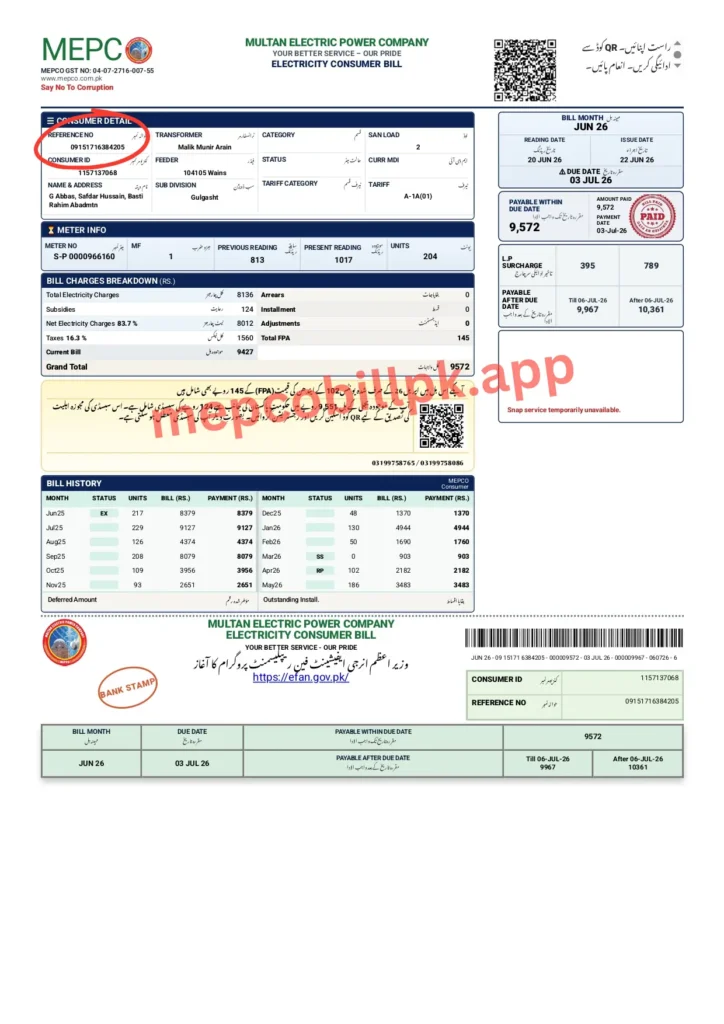
MEPCO Bill Check by Reference Number
Enter your 14-digit reference number to view your latest electricity bill, unit consumption and payment details. Compare the units with previous months and review the tariff category shown on the bill; a single unit threshold does not by itself explain every change in the payable amount.
Your Reference Number identifies your electricity connection in the billing system.
To check your bill:
- Take a previous MEPCO bill.
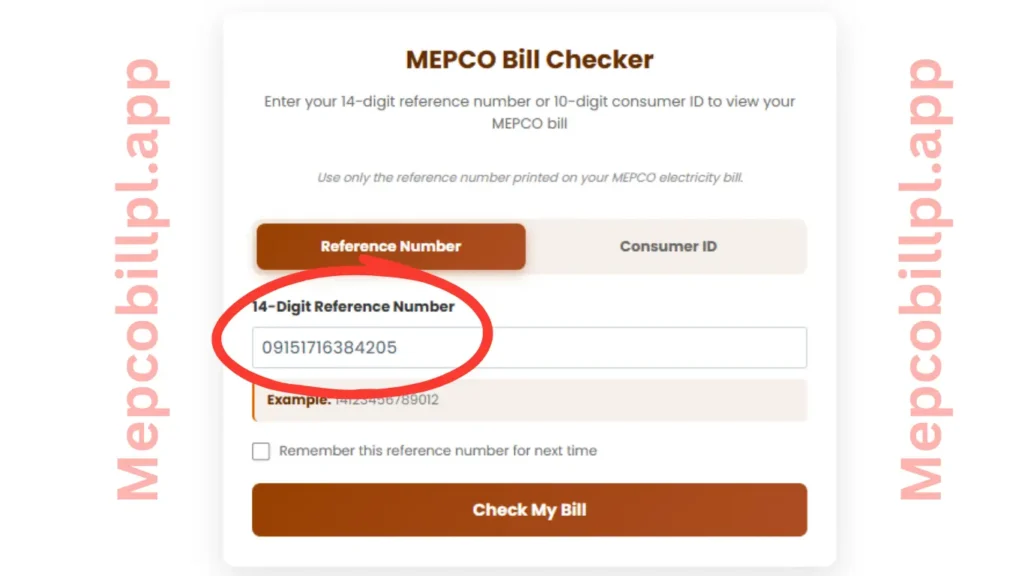
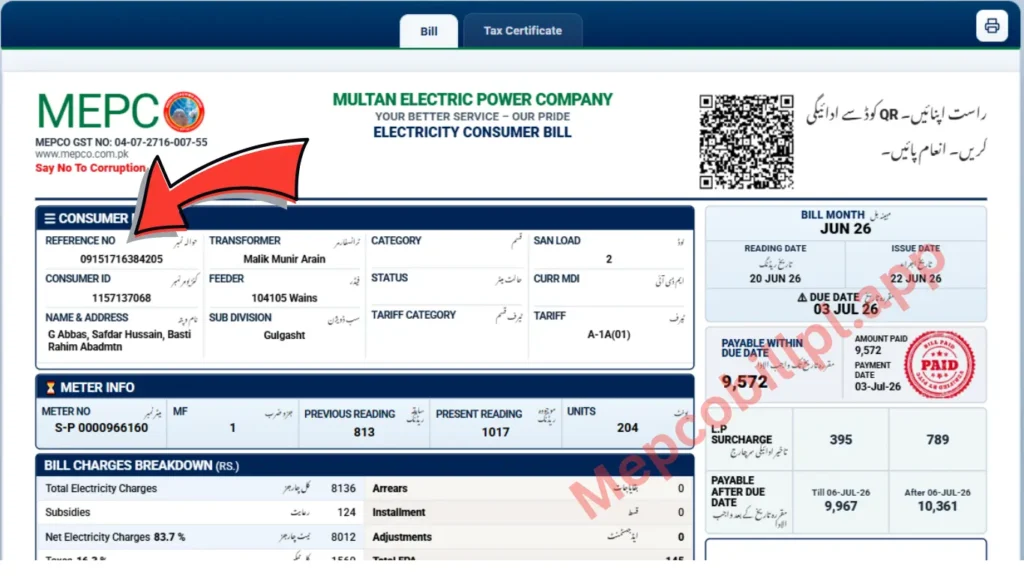
- Find the Reference Number printed on it, for example 09151716384205.
- Enter the complete number in the bill checker.
- Check that no digit is missing or incorrectly typed.
- Submit the number to view the available bill.
Pro tip: It is a good idea to save your Reference Number somewhere secure on your phone. You do not need to search for an old paper bill every month if you already have the correct number saved.
Check MEPCO Bill by Consumer ID
Some people may not understand what the Reference Number is or may be confused about how to find it. If that’s the case, the official Web Bill portal also provides a Consumer ID search option, allowing you to check your electricity bill easily using your Consumer ID.
- Select the Consumer ID option.
- Enter the number exactly as shown on your bill.
- Submit the information.
- Confirm that the bill belongs to your connection.
The Consumer ID can be useful when you do not have your Reference Number immediately available.
Where Is the MEPCO Reference Number?
Look for the field labelled Reference No or Reference Number on a previous bill.
Do not confuse it with:
- meter number;
- bill number;
- CNIC number;
- account information;
- payment transaction number.
Entering an incorrect number in the Reference Number field may show an invalid-number message or return no useful results. Please enter the actual 14-digit Reference Number printed on your WAPDA MEPCO bill. A sample 14-digit number is provided here for guidance only.
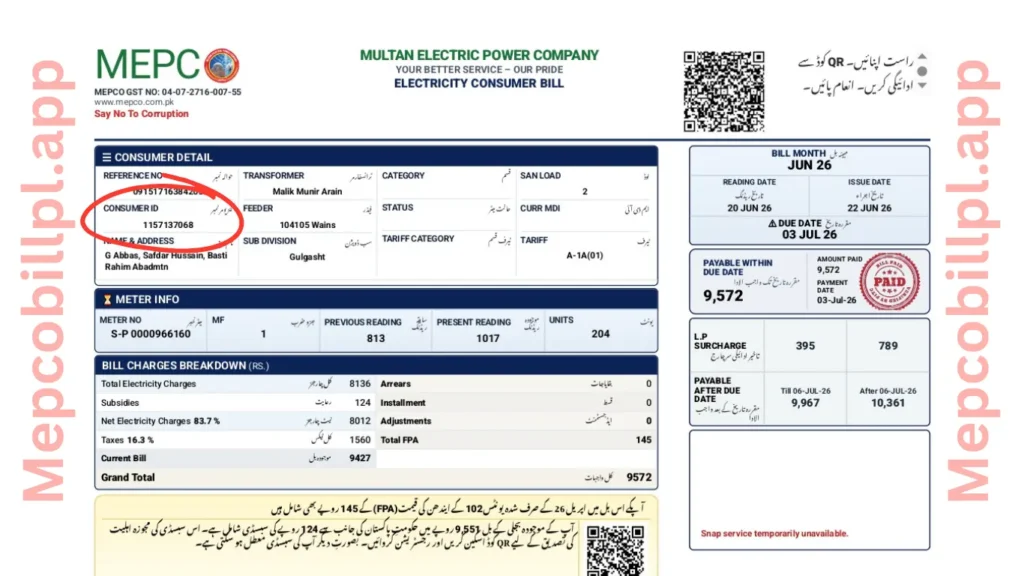
Where Is the Consumer ID?
To find your Consumer ID, simply look at your official printed electricity bill. As shown in the image below, the Consumer ID is printed just below the Reference Number.
You can easily note it down and keep it safe in your wallet or save it on your phone. This will make it much easier to check your bill online in the future using the MEPCO Bill Checker.
The Consumer ID is only 10 digits long, making it shorter and easier to remember than the 14-digit Reference Number. Simply enter your Consumer ID to access your electricity bill online.
A practical method is to create a phone contact or secure note called:
Home MEPCO Connection
Then save:
Reference Number: [your number]
Consumer ID: [your number]
Do not publicly post screenshots containing your personal billing or account information.
Can You Check a MEPCO Bill Without a Reference Number?
Yes, you may still be able to search for your bill if you have the Consumer ID, because the official MEPCO web-bill interface provides both Reference No and Consumer ID search methods.
This is the simplest alternative when you cannot find the Reference Number.
Take an older bill, locate the Consumer ID and use the corresponding search option.
Can You Check a MEPCO Bill by CNIC?
Do not assume that a CNIC number can simply be entered into a Reference Number field. The official MEPCO web-bill search page currently presents Reference No and Consumer ID as its bill-search options. The safest approach is to use one of the identifiers actually supported by the bill-checking system.
If you no longer have any previous electricity bills and cannot find your Reference Number or Consumer ID, don’t worry. You can contact MEPCO’s official customer support to recover your connection details.
Call the MEPCO helpline at 118 or the toll-free number 0800-63726 for assistance. If needed, you can also contact the MEPCO Head Office in Multan at 061-9220313.
Once your connection details are verified, the support team can help you obtain your Reference Number or Consumer ID so you can check your electricity bill online.
Can You Check a MEPCO Bill by Mobile Number?
No. MEPCO does not provide a system that allows you to check your electricity bill using only a mobile number. To access your bill, you need either your 14-digit Reference Number or your 10-digit Consumer ID.
A mobile number should not be considered a substitute for a Reference Number unless the specific service you are using officially supports bill lookup by mobile number.
For a normal online bill search, use the connection information requested by the checker rather than repeatedly entering unrelated personal details.
Download and Print Your MEPCO Duplicate Bill
Simply enter your MEPCO Bill Reference Number to view your electricity bill online. You will see a full-color copy of your bill, which you can print by clicking the Print button.
Please note that this is a duplicate copy of your bill for reference and printing purposes. It is not the original printed bill issued by MEPCO.
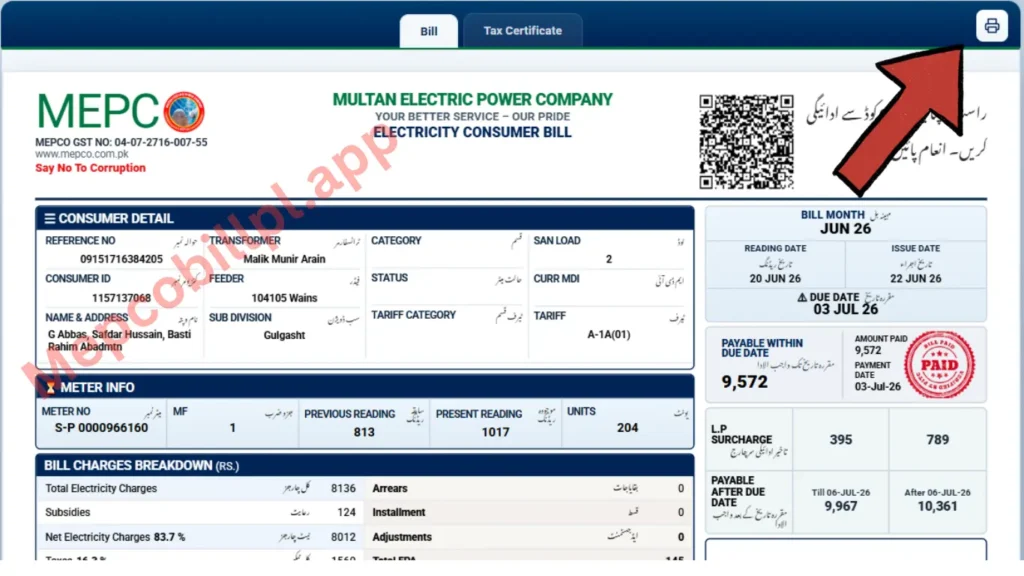
After checking the bill online:
- Open the complete bill.
- Check that it belongs to your connection.
- Select the print option.
- Print a physical copy or save it as a PDF.
You do not need to wait for another paper bill simply to keep a copy of information that is already available through the online bill system.
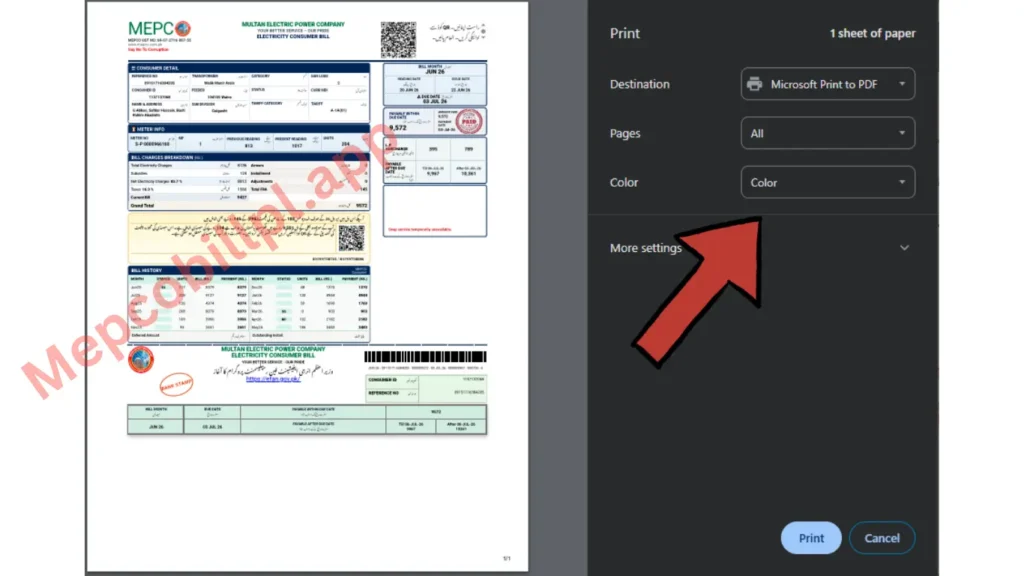
How to Save a MEPCO Bill as PDF
On many computers and phones:
- Open the bill.
- Choose Print.
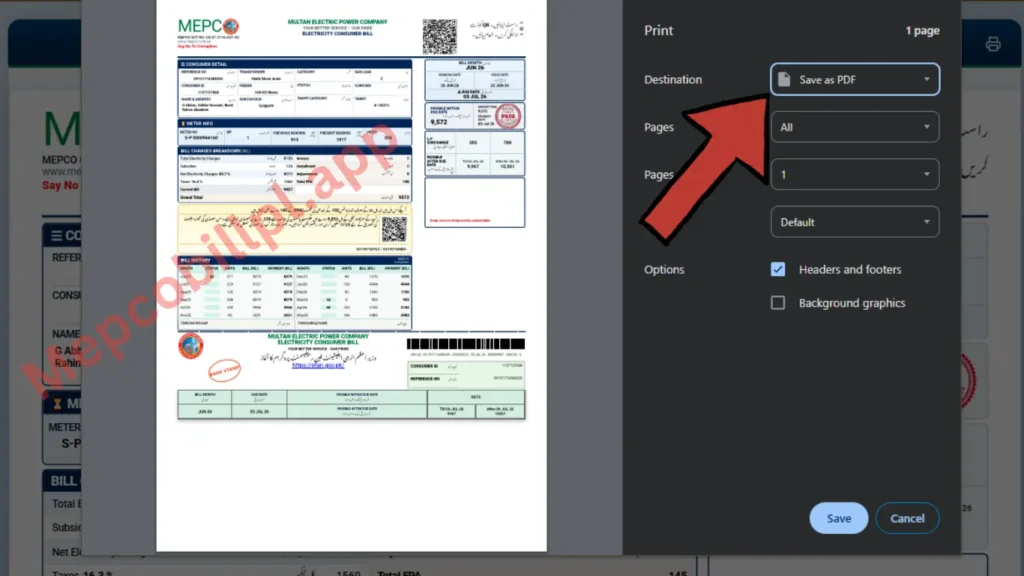
- Select Save as PDF instead of a physical printer.
- Choose a folder.
- Give the file a useful name.
For example:
MEPCO-Bill-July-2026.pdf
Using the month in the file name makes your bills much easier to find later.
A Better Way to Organise Your Electricity Bills
Instead of downloading bills randomly into your phone’s Downloads folder, create one folder:
MEPCO Bills
Then save each bill using the same format:
- MEPCO-Bill-January-2026
- MEPCO-Bill-February-2026
- MEPCO-Bill-March-2026
This gives you your own simple bill history. It also makes month-to-month comparisons much easier when a future bill suddenly looks unusually high.
A Simple Way to Investigate a High Bill
Here is a practical method you can use before assuming that a high bill is automatically incorrect.
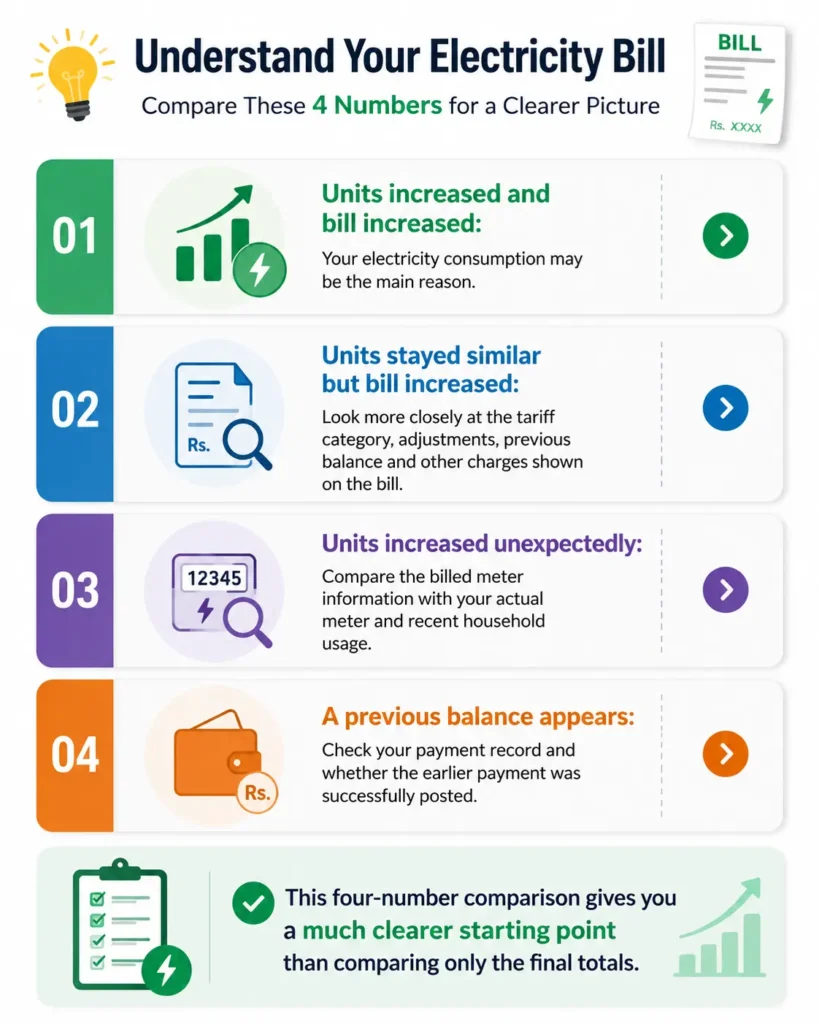
Take your current bill and previous bill and compare these four numbers:
1: Previous Month’s Units
Compare your electricity usage with last month’s bill. Check how many units you used last month versus this month to see if your consumption has increased or decreased.
2: Current Month’s Units
Has your electricity consumption increased? Compare this month’s units with previous months and note whether the tariff category or other bill components changed.
3: Previous Payable Amount
Check your previous bill to see the total amount and the number of units you consumed.
4: Current Payable Amount
Compare your previous bill with your current bill. Check how much the total amount has changed—you’ll get a clear idea of what caused the increase or decrease.
What Information Should You Check on Your MEPCO Electricity Bill?
An electricity bill is more than a payment slip. It is also a monthly record of your connection and consumption.
Consumer and Connection Details
Check that the bill belongs to the correct electricity connection.
This is particularly important if you manage bills for more than one property, shop, office or family home.
Billing Period
Check which month or billing cycle the statement covers.
Meter Reading and Units Consumed
The number of electricity units used is one of the most important figures when trying to understand a change in your bill.
Due Date
Pay attention to the due date rather than assuming it is the same day every month.
Current and Previous Amounts
If a bill contains a previous balance or another adjustment, the final payable amount may not represent only the electricity consumed during the latest billing period.
Why Is My MEPCO Bill So High?
There can be many reasons why your MEPCO electricity bill is higher than usual. In most cases, this happens during the summer months when electricity consumption increases. You may have used more electrical appliances, air conditioners, or other high-power devices at the same time, resulting in higher unit consumption.
A higher bill is usually caused by increased electricity usage, but it can also result from other factors such as tariff changes, previous balances, fuel price adjustments, taxes, or other charges included in the bill. Checking each section of your bill can help you identify the exact reason for the increase.
Your Electricity Usage Increased
Air conditioners, electric heaters, water pumps, irons and other high-use appliances can make a noticeable difference when they are used more frequently.
Sometimes no single appliance is responsible. A few extra hours of daily use across several appliances can add up over an entire billing period.
Your Usage Pattern Changed
Ask what was different this month.
Were more people staying at home?
Was an air conditioner used for longer?
Did the water pump run more often?
Was the weather unusually hot?
Was a new appliance added?
A bill often makes more sense when you compare it with what actually changed inside the property.
The Tariff or Bill Components May Differ
MEPCO’s official tariff information notes that electricity rates can vary according to factors such as consumer category, consumption and time of use. Because tariff information can change, current rates should be checked against the official tariff information and the bill itself rather than relying on an old rate table copied from another website.
Look for any unpaid balance or adjustment shown on the bill.
Meter Reading Looks Unusual
If the consumption shown appears seriously different from your normal pattern, compare the bill information with your previous bills and the actual meter.
Do not make a complaint based only on a feeling that the amount is high. Gather the relevant numbers first.
Your Bill Looks Wrong? Build a Simple Evidence Pack
This is one of the most useful things you can do before reporting a billing problem.
Create a small bill evidence pack containing:
- the current bill;
- the previous bill;
- a clear photo of the current meter display;
- the date and time the meter photo was taken;
- proof of any previous payment relevant to the problem;
- a short written explanation of what appears incorrect.
For example:
My previous bill showed 420 units. The current bill shows 910 units, but our household usage has not changed significantly. I have attached both bills and a dated photo of the current meter display for comparison.
That is much more useful than simply writing:
Please fix my bill. It is too high.
The PITC Customer Complaint Management System advises consumers that complaints may be submitted in writing and that relevant documents can be included, which makes keeping clear supporting information a sensible step.
Sometimes the problem is not the bill. It is the information entered into the checker.
Check Every Digit Again
A single wrong digit can prevent the correct bill from loading.
Do not type the number from memory unless you are completely sure it is correct.
Make Sure You Selected the Correct Search Method
A Consumer ID should be entered using the Consumer ID option, while a Reference Number should be entered in the relevant field.
Copy the Number From a Previous Bill
Using an older bill is usually safer than guessing the number.
Remove Accidental Spaces
If you copied the number from a note or message, make sure no unnecessary spaces or characters were added.
Confirm That You Are Using the Correct Connection
People managing several electricity connections can easily copy the wrong saved number.
Label saved numbers clearly, such as:
- Home MEPCO
- Shop MEPCO
- Office MEPCO
The Latest Bill May Not Yet Be Available
If the current billing cycle has not yet been processed or published through the system, repeatedly refreshing the page may not produce a new bill immediately.
Check again later and use official customer-support channels if the problem continues.
What to Do When a Bill Shows “Invalid” Information
Do not keep submitting random numbers.
Go back to a previous bill and check:
- Whether you copied the complete Reference Number;
- Whether you selected Reference Number instead of Consumer ID;
- Whether any digit was omitted;
- Whether you are using details from the correct electricity connection.
The official PITC bill page itself can display an invalid-reference message when the submitted information is not accepted. If the information is correct but the problem continues, use an official support channel rather than relying on repeated guesses.
How to Check Whether a Previous Bill Was Paid
Start with your own payment record.
Check:
- banking app transaction history;
- digital wallet history;
- payment receipt;
- bank statement;
- confirmation message.
Do not delete payment confirmations immediately after paying an electricity bill.
A simple monthly habit can help:
- pay the bill;
- save the receipt;
- rename the screenshot or PDF with the month;
- keep it until the next billing cycle confirms there is no payment problem.
For example:
MEPCO-Payment-July-2026
If a previous payment appears to be missing from the billing record, your payment receipt gives you something specific to refer to when reporting the issue.
How to Read Your MEPCO Electricity Bill Without Getting Confused
Electricity bills contain several figures, and the largest number on the page is not always the best place to begin.
Read the bill in this order:
Confirm the Consumer
Make sure it is your connection.
Check the Billing Period
Make sure it is the correct month’s bill.
Check the Units
Compare them with your previous bill.
Check the Current Charges
See what has been charged for the current billing period.
Look for Other Amounts
Check for previous balances, adjustments or other items shown.
Check the Due Date
Do not leave payment planning until the last moment.
This order turns a complicated-looking bill into a simple sequence of questions.
MEPCO Bill Charges, Taxes and Adjustments
Your final electricity bill may contain more than a basic calculation of units multiplied by one fixed price.
The applicable tariff can depend on the type of consumer, consumption level and, for relevant connections, time-of-use arrangements. MEPCO’s official tariff page directs consumers to official tariff information for accurate current details. Because tariffs and related charges can change, avoid relying on an old social media post or an outdated screenshot when trying to calculate an exact current bill.
The best approach is to compare:
- the current bill;
- the applicable official tariff information;
- your consumer category;
- your actual units consumed.
For a detailed explanation of specific bill components, use a dedicated and regularly updated MEPCO tariff and bill-charges guide rather than overcrowding the main bill checker with rate tables that may become outdated.
How to Pay Your MEPCO Bill
After checking the bill, choose a payment method available to you through an authorised payment channel.
Depending on the services supported by your bank or payment provider, electricity bills may be payable through options such as digital banking or other approved bill-payment facilities.
Where can you pay a MEPCO bill?
Use an authorised channel supported by your bank or payment provider, such as mobile or internet banking, an ATM, a bank branch or an approved digital wallet. Available billers and payment methods can change, so confirm the consumer name, billing reference and amount before submitting.
Always check:
- the consumer or company name;
- bill amount;
- billing reference;
- payment confirmation.
Be especially careful if an individual contacts you and asks you to transfer money directly to a personal account for an electricity-related service. The official PITC complaint system specifically warns consumers not to make direct payments to individuals for bills, meters, repairs, bill adjustments, new connections or other electricity services. Save your payment receipt after the transaction is complete.
MEPCO Bill Due Date and Late Payment
The due date is one of the first things you should check when opening your latest electricity bill.
Do not assume:
- every month’s due date will be identical;
- an old screenshot contains the latest payment information;
- a previously downloaded bill is still the current bill.
Open the latest available bill and check the information shown there.
If you are dealing with a special issue such as a billing dispute, due-date extension or installment request, confirm the current procedure through official MEPCO customer-service information because procedures and eligibility conditions can change.
A Better Way to Reduce Your Electricity Bill
Generic advice such as “use less electricity” is not very helpful.
A better approach is to find where your electricity is actually going.
Step 1: Compare Monthly Units
Do not compare only the rupee amount.
Write down your electricity units for several months.
For example:
| Month | Units Used |
| April | 310 |
| May | 365 |
| June | 520 |
| July | 690 |
Now you can see when consumption started rising.
Step 2: Match the Increase With Your Lifestyle
Ask:
- When did we start using the AC regularly?
- Did school holidays keep more people at home?
- Did we add a freezer, water pump or another appliance?
- Did an appliance start running for longer than usual?
Step 3: Focus on Repeated Use
An appliance used every day can matter more than something powerful that is used only occasionally.
Step 4: Check the Next Bill
Energy-saving advice is useful only when you measure the result.
Compare the next month’s units. If consumption falls, you know the change had an effect.
MEPCO Complaints and Customer Support
MEPCO’s official website provides customer-care resources and links to its complaint system, while PITC operates the Customer Complaint Management System for registering and tracking complaints. The portal currently lists:
- 118 for the contact centre;
- 8118 for SMS;
- an official complaint email channel;
- online options to register and track a complaint. When filing a complaint, explain the issue clearly and keep supporting records available.
A useful complaint description answers four questions:
- Which electricity connection is affected?
- Which bill or billing month is involved?
- What exactly appears to be wrong?
- What evidence do you have?
Clear information usually makes a complaint easier to understand than a long emotional description without dates, readings or documents.
About MEPCO
MEPCO stands for Multan Electric Power Company. Its official website provides access to electricity-related customer services, including bill checking, customer care, tariff information, complaints and other consumer resources. Searching for a MEPCO online bill, however, the immediate goal is much simpler: find the correct bill, check the details and deal with any problem quickly.
That is why a useful MEPCO Bill Checker page should place the bill-search tool first and explanations second.
MEPCO Bill Check FAQ
Can I check my MEPCO bill using CNIC number?
No. The bill-search interface uses a reference number or consumer ID rather than CNIC lookup. If you cannot find either identifier, contact MEPCO on 118 or 0800-63726 and follow its identity-verification instructions.
What is a duplicate MEPCO bill?
A duplicate bill is an online copy of the available PITC billing record. Check the consumer details, amount and due date, then use an authorised payment channel supported by your bank or payment provider.
How do I check old MEPCO bill history?
When you check your current bill using our tool above, the PITC portal shows your last 12 months of bills with billing month, units, amount, and payment status.
What does “Bill Not Found” mean?
It means the number entered does not match any record. Common causes: spaces between digits, confusing reference number with consumer ID, or checking before the current month’s bill is generated.
How do I contact MEPCO about a bill?
Call 118 or 0800-63726. You can also submit and track a written complaint through the official PITC Customer Complaint Management System; the complaint service lists 8118 as its SMS channel.